Excel example
Excel forecast workbook generated by OfficeMaker
This demonstration is a two-sheet workbook. Assumptions holds the inputs. Forecast calculates three months with native Excel formulas.
Direct answer
OfficeMaker created this XLSX on 22 October 2026. The Forecast sheet contains 12 formulas, including cross-sheet references and SUM. This demonstration does not include a chart.
What was generated
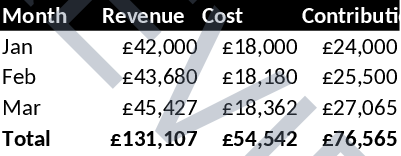
Sheet names are Assumptions and Forecast. January revenue and cost are formulas pointing at the assumption cells. February and March grow from the previous month. The total row sums each column. Header cells use fill and bold formatting. A chart was not included because this payload did not define one.
Business use case
Finance can keep the assumptions in one sheet and let Excel recalculate the forecast when an input changes. The starting revenue of 42000 and the growth rates are demonstration inputs, not a forecast for a real business.
Structured input
The create call used document type excel. Cells sit on each sheet as a flat cells array with row, col and either a value or a formula. Formulas omit the leading equals sign, for example SUM(B2:B4) and Assumptions!B2.
MCP and API workflow
- Call get_minimal_schema for excel.
- Put formula cells in the sheet cells array. A rows wrapper was ignored by the generator used for this file, so the working payload uses cells directly.
- Download the XLSX and open it in Excel so the formulas recalculate.
Limitations
These files were created on 22 October 2026 through the OfficeMaker document service. The business names and figures are a demonstration, not a customer engagement or a price list.
Creating a new DOCX, XLSX or PPTX is available on the public free host. Merging into an existing Office file, or editing an existing file through the API, is a paid document-service operation.
The download on this page is the generated Office file. Open it in Microsoft Word, Excel or PowerPoint and continue editing it there.
This workbook does not contain a chart, pivot table or macro. Add a chart only when the live Excel schema for that request documents the chart fields.
Try OfficeMaker · Excel generator
Questions
- Are the forecast numbers stored as text?
- No. The Forecast sheet stores Excel formulas. January revenue is Assumptions!B2, later months reference the previous row, and the total row uses SUM.
- Does the free tier edit an existing workbook?
- No. This example is a newly created workbook. Editing an existing XLSX through the API is a paid operation.